
This blog article covers the enhancements in the Generative Design role as well as certain apps of the parametric design automation workflow such as design exploration, process composer and result analytics.
OVERVIEW OF EXPLORATORY METHODS
To recap, there is a broad category of design exploration techniques available in the 3DExpereince platform. Each of these categories can be further divided into subcategories based on the underlying algorithm. However, one common theme in all these methods is they operate upon the parameters. Hence, a well parametrized model is a pre-requisite to use any of these methods.

There is another flavor of design exploration that is not based on parametric approach. It is based on topology that is applicable directly on the underlying FEM instead of parameter-based geometry.
These techniques are packaged in 3DX apps based on the user personas and roles. A given 3DX role may have one or more of these apps based on the user profile. A few of these apps with corresponding role (trigram) are below:

Design Exploration Updates
App Name: SIMULIA Design Exploration app (OPZ role)
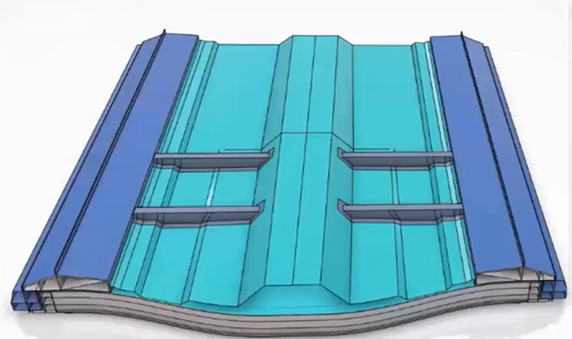
- New Topology Optimization Updates: The bead optimization functionality was introduced in 2022x. The algorithm has been modified to capture bead and shell interaction feature in 2024xFD01 to prevent bead penetration into shells. Another improvement in the study is the inclusion of shape optimization for durability analysis support as well as sizing optimization. The gauge thickness for sizing optimization has been introduced in 2024xFD01.
- Usage Enhancements: General generative design enhancements in design exploration include Job Restart after interruption (2023xFD01), Mesh Initialization (2023xFD02), Job Monitoring (2023xFD04) and API’s for scripting (2024xGA)
Parametric Design Updates
App Name: SIMULIA Parametric Design Study (multiple roles)
- Knowledgeware Enhancement: The parameters of string type defined in knowledge ware can now be used on the parametric design study app as a design variable. A typical example would be a length parameter defined as “small”, “large” or “extra large”. 2023xFD01
- Product Table Support: Like design tables in V5 to change the design of a model by changing parameters, there are design tables for parts and product tables for assemblies in 3DX to play with parameters. The product tables can now be picked in parametric design study apps to configure design variables. 2023xFD02
- Product Weight Support: The weight of the full product structure is now included in MDG and M3H roles and it can be used as a design response in parametric design study or design exploration app. The responses can be used as constraints or as objective functions. 2023xFD03
- Concept shapes as design variables: The CATIA concept structure engineer role which is the equivalent of CATIA SFE concept design can now talk to FE based simulation. These concept shapes can be defined as design variables to be used in parametric design study. This is more of an automation enhancement as the design study app does not use any of its algorithms to recommend design change. It just uses the designs created in concept structure’s role to simulate and perform result analytics. 2023xFD02

- Creative Design Experience as design variables: The creative design experience is sort of a free style morphing in which the user can change the design using the “click and drag” approach without any underlying parameter. It has been more of an aesthetic application. However, every creative piece of design should be validated with engineering. These creative designs can be defined as design variables and used in parametric study for simulation. 2023xGA
- SOBOL Enhancement: This DOE technique was added a few releases earlier. The technique now includes corner points as well. There is a separate input for the number of corner points along with number of interior points to capture the boundaries of design space more effectively. 2023xGA
- Failure Diagnostics: The optimization run can be monitored for the various stages of execution such as geometry update, results image generation etc. The failed points can be diagnosed with more details such as stage, location, and reason of failure. The failure message is shown as a tooltip. 2023xFD01
Process Composer and Visualization Updates
App Name: SIMULIA Optimization Process Composer and Result Analytics
- Optimization Adapter: The Optimization algorithm can give optimum results faster with an intelligent choice of starting point. It is now possible to pick the best result of DOE as a starting point for optimization. In addition, the adapter reuses the existing data from the previous jobs of the same process in case of rerun. 2023xFD01

- Reliability Adapter: This functionality works in conjunction with other adapters such as DOE and Optimization. It calculates the probability of failure of optimum points in the presence of uncertainty or randomness of certain design inputs. The random behavior is defined in terms of probability distributions and can be associated with geometry, material, or loading. The optimum point shifts accordingly based on defined and acceptable failure limits. 2023xFD01
- Approximation Updates: A new approximation technique called “Latent Variable Gaussian Process” or LVGP has been introduced. It does a better job in linearizing the models in which both quantitative and categorical inputs exist such as choice between different cross sections or different materials or concept structure shapes. 2023xFD01


Leave a Reply