
Autodesk Fusion comes with built-in Product Data Management (PDM) to help teams work collaboratively and efficiently throughout the design and manufacturing cycle. CAD-integrated cloud PDM in Fusion allows designers to focus on their tasks with reduced interruptions allowing for more creativity and success on projects.
Immediate Benefits of Autodesk Fusion PDM
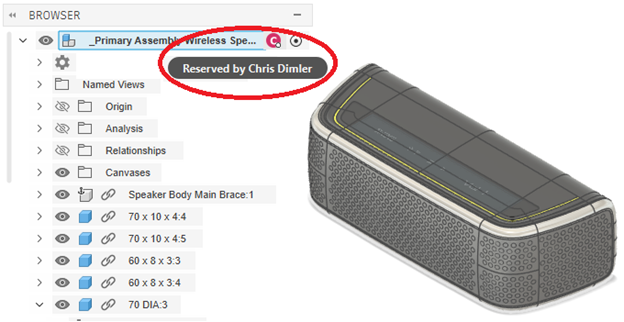
PDM is built into the foundation of Fusion, so it just works immediately without much set up besides adding team members with appropriate roles. One of the first things that Fusion will reveal to you when you make an edit is the “Reserved by” status. Other team members will also know the status and will be prevented from editing reserved files.

Centralized data in the cloud, your data is accessible, secure and available to team members to collaborate immediately and every step of the way.
Collaborate in the cloud, your data is always available and tracked by Fusion from start to finish of all projects. This cloud-based workflow prevents you from making the typical mistakes of not knowing who’s working on what, which files are the latest, and it helps you avoid redundant and manual re-entry of data.
- Fusion is designed for teams to work in real time, immediate updates connect you to your team members.
- You can always see who is viewing or editing your components.
- Designs are reserved automatically when editing to avoid conflict.
- Changes are tracked over time, you can always go back and see what changes are made, when and by which team members.
- When you edit a component, it automatically reserves it for you so you can make your edits while others work on other parts of the design.
- When Property changes are made, the values are automatically written to the BOM.
- View History of any file to display property and BOM edits, and snapshots showing changes to the design over time.
- Use the Create Version command to capture a meaningful milestone.
- All BOM values when modified in the assembly will automatically update affected parts and sub-assemblies, the downstream drawings will update as well.
Let’s peek at some of the built-in PDM tools at your fingertips
Design Details and Versions
Fusion captures every change with a unique timestamp, so you can see property edits and design changes over time. Use the “Create version” command to save important milestones based on all changes up to that point. You can filter your component history to display only the version milestones, and you can refer to them whenever you need.

Design HISTORY
One of my favorite features is how easy it is to review and track the History of any design. In the HISTORY dialog you can Filter to display exactly what you want to see at a given time. It’s easy to filter and display the Versions (Milestones of a design), or maybe you want to focus on the Property, Part Number or BOM Edits and see who modified it.

Fusion BOM management
Easily explore and modify the property values for the entire assembly. Part Number modification automatically does a system-wide check to ensure uniqueness. All edits in the BOM are immediately committed and available for team members as live data.
Share BOM information
A fast way to share BOM information is to Copy Link directly from the BOM itself.

Why Autodesk Fusion for data management
The entire data management experience lends itself naturally to designers because it’s built into the foundation and core of Fusion. The data management tools are at your fingertips and team members easily collaborate at every stage of the design process while protecting your data along the way. An integrated cloud based PDM solution might just be exactly what you are looking for.
Try it out, I think you will love it!


Leave a Reply