


Off of the shelf and out of the box, NX Weld Assistant offers a wide range of welding and material fastening capabilities. To enhance your experience using NX Weld Assistant, Siemens makes it easy to configure the software to fit your unique material joining application needs.
Let’s take a look at an example of how configuring the customer default settings will make a difference in how you can view welds and other methods of material joining.


We’ll start with Resistance Spot Welding. Notice the spot weld on the part in the image to the right.
The current default is set to create a green sphere that is 6mm in diameter. Since the symbol for a weld spot can differ with each company, Siemens allows you to configure their software settings to create a custom weld symbol.
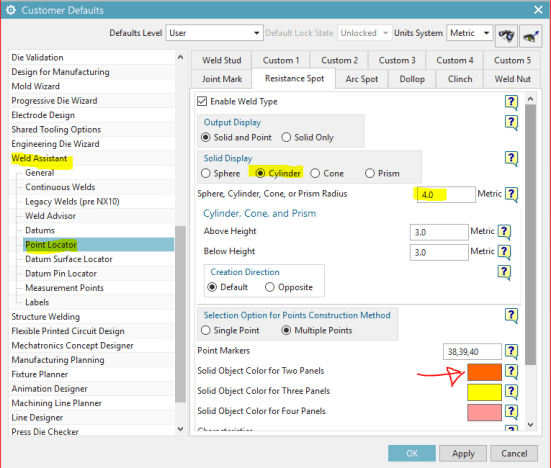
Let’s adjust the Customer Defaults to create an 8mm diameter cylinder, and we’ll make it orange!
Here’s how we do it:
- Select File + Utilities + Customer Defaults
- In the Customer Defaults window pick Weld Assistant + Point Locator and then select the Resistance Spot tab
- From Solid Display; choose Cylinder
- Set the radius to 4.0 and change the color for two panels to orange
- Don’t forget to restart your NX session for the changes to take effect

Now create a spot weld and see the change.


Yes, you can have a different color for 2T versus 3T versus 4T welds…!
Key benefits to modeling welds in Cad include:
- Provides a key piece of information necessary for a complete Digital Twin.
- Mass properties inclusion (Weight and Volume).
- Easy to visualize.
- Easy to validate for correct location using Weld Advisor.
- Easy to convey information via a Drawing or PMI
- Available for inclusion into CAE analysis
- Available for process planning
- Available for robot programming
- Significant time savings compared to manual application of welds
- Having the ability to create and validate the welds in CAD ensures quality data is being sent to manufacturing thereby reducing the amount of rework.
Tata Technologies is a Siemens Platinum Smart Expert Partner indicating our validated expertise in NX-CAD.


To see how Tata Technologies can help your organization, visit our website www.tatatechnologies.com.
Or contact us for a demonstration.
Send us an email Marketing.NA@tatatechnologies.com

